This article records how to add a WordPress floating contact sidebar: WhatsApp and email buttons on the right of desktop pages, with a contact bar at the bottom on mobile. Shared HTML, CSS and JavaScript keep the contact entry points available across a business website.
1. Create an HTML snippet
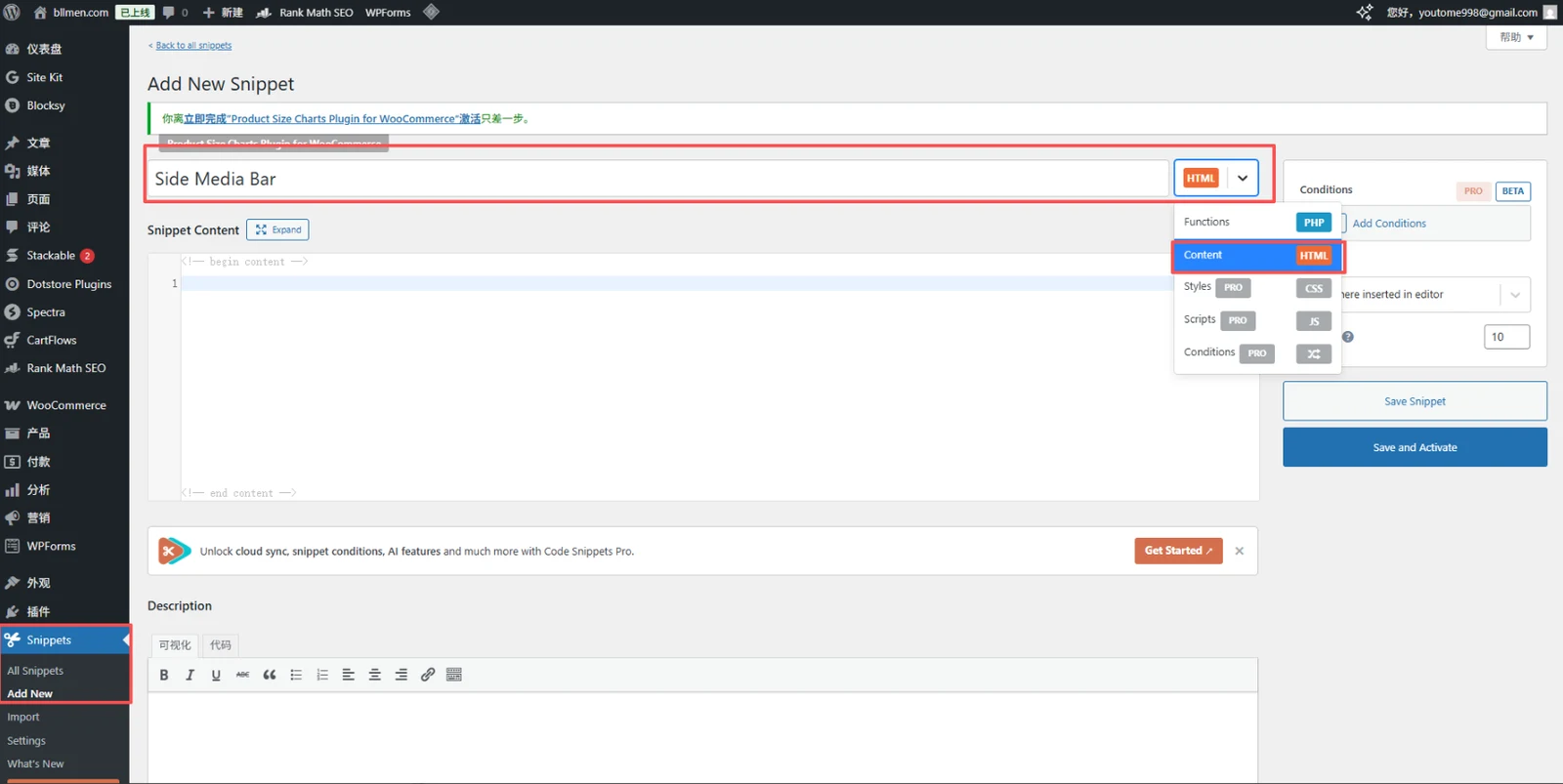
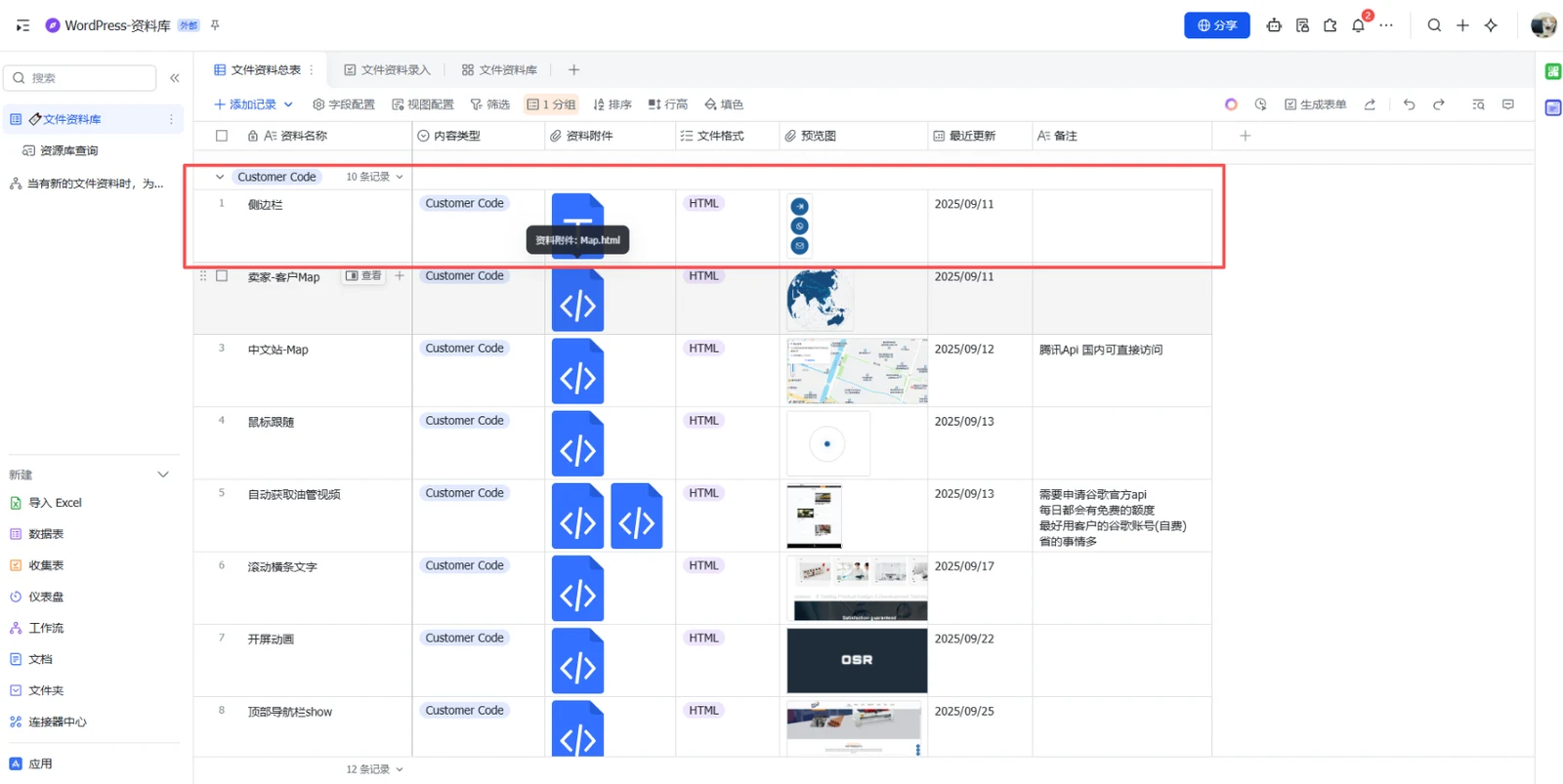
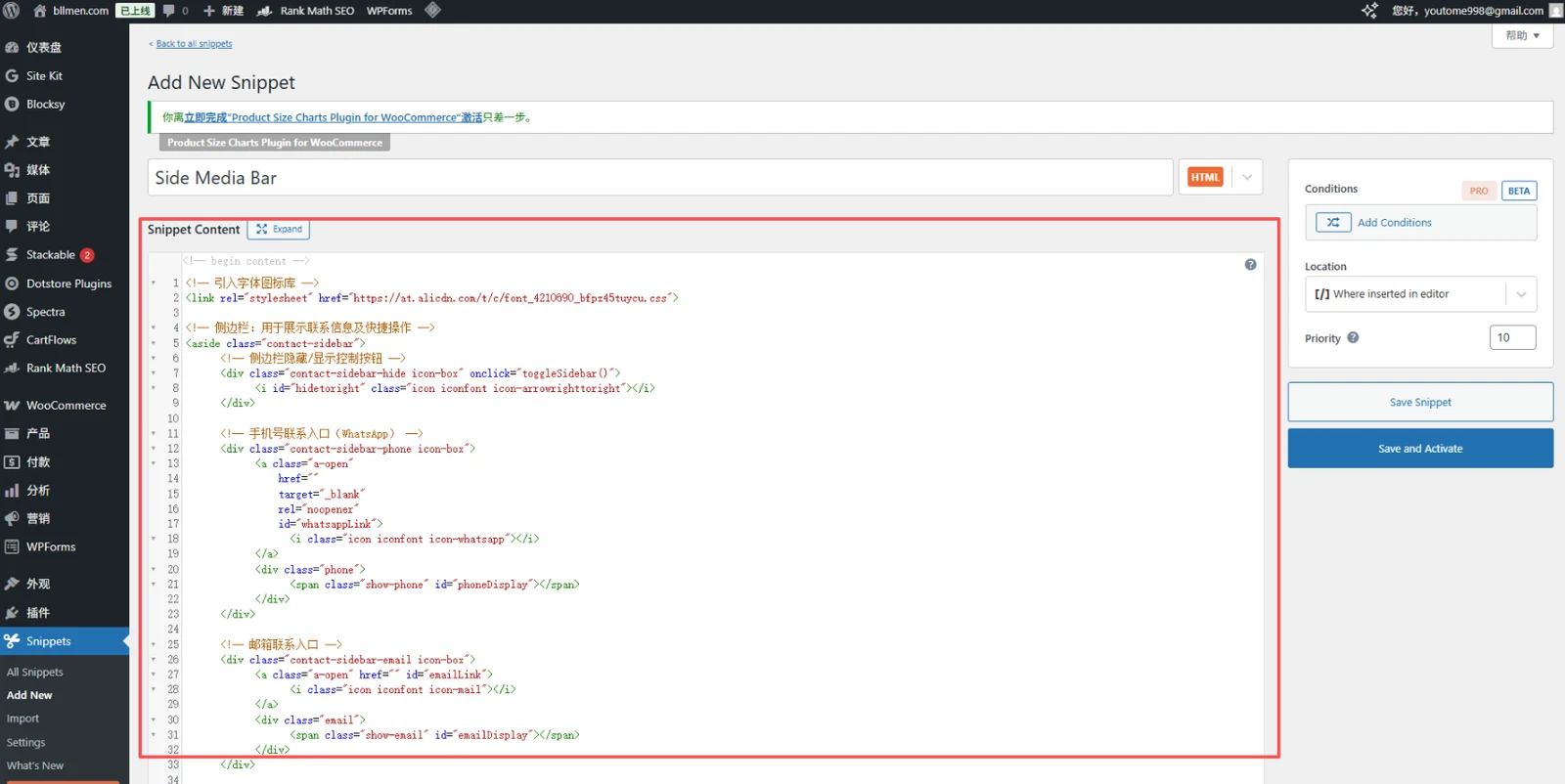
Create an HTML snippet in your code snippets plugin and paste the complete example below. Check whether the theme already supplies a contact bar so that visitors do not see duplicate buttons.
2. Replace contact details and styles
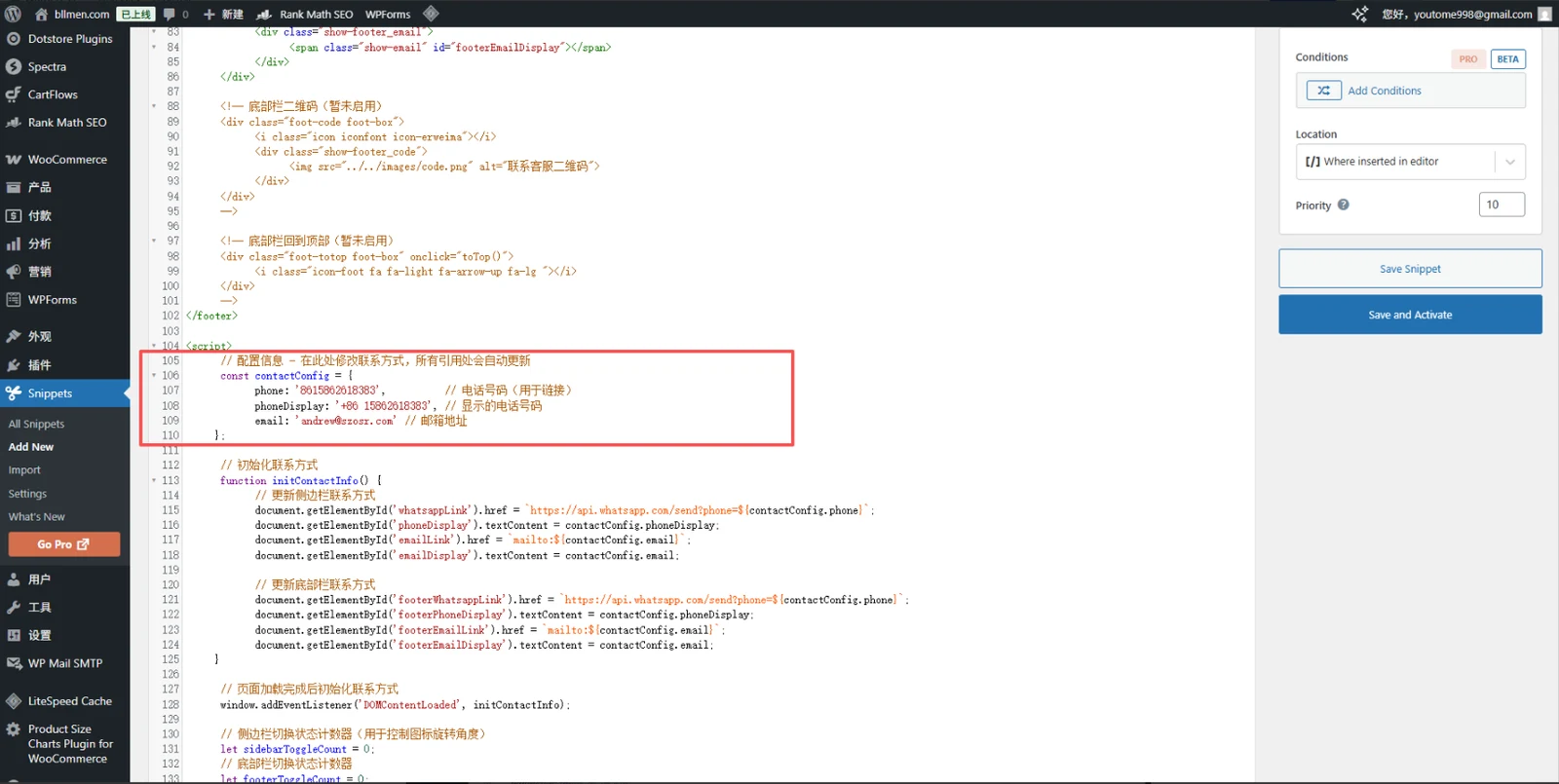
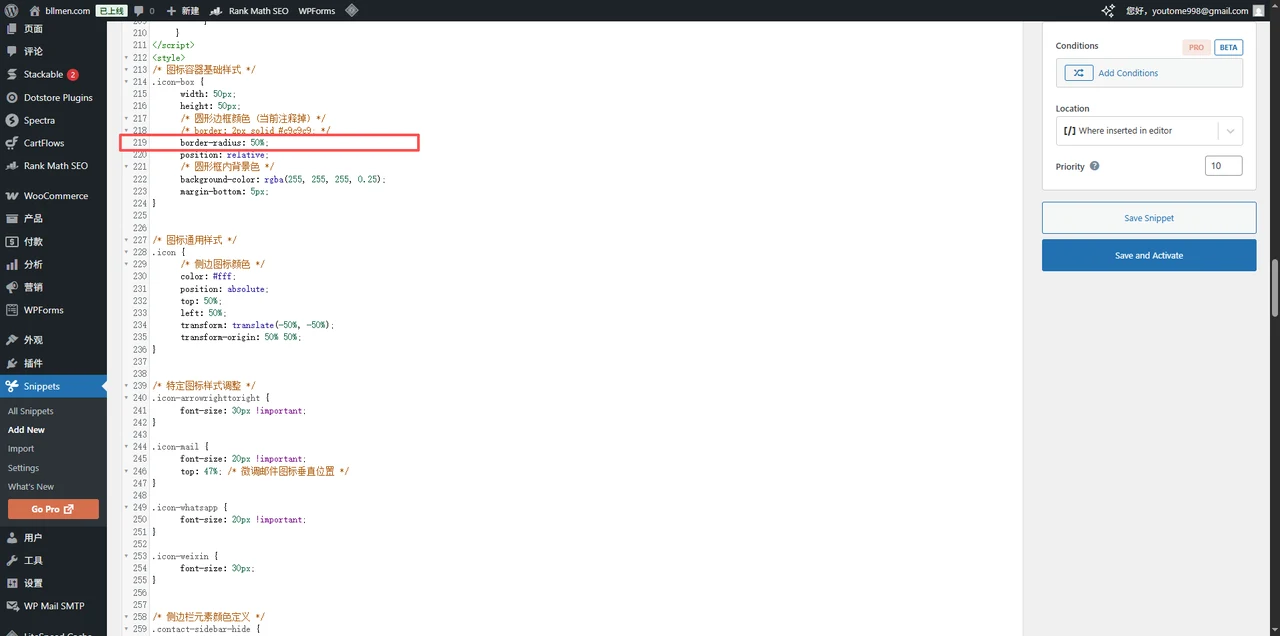
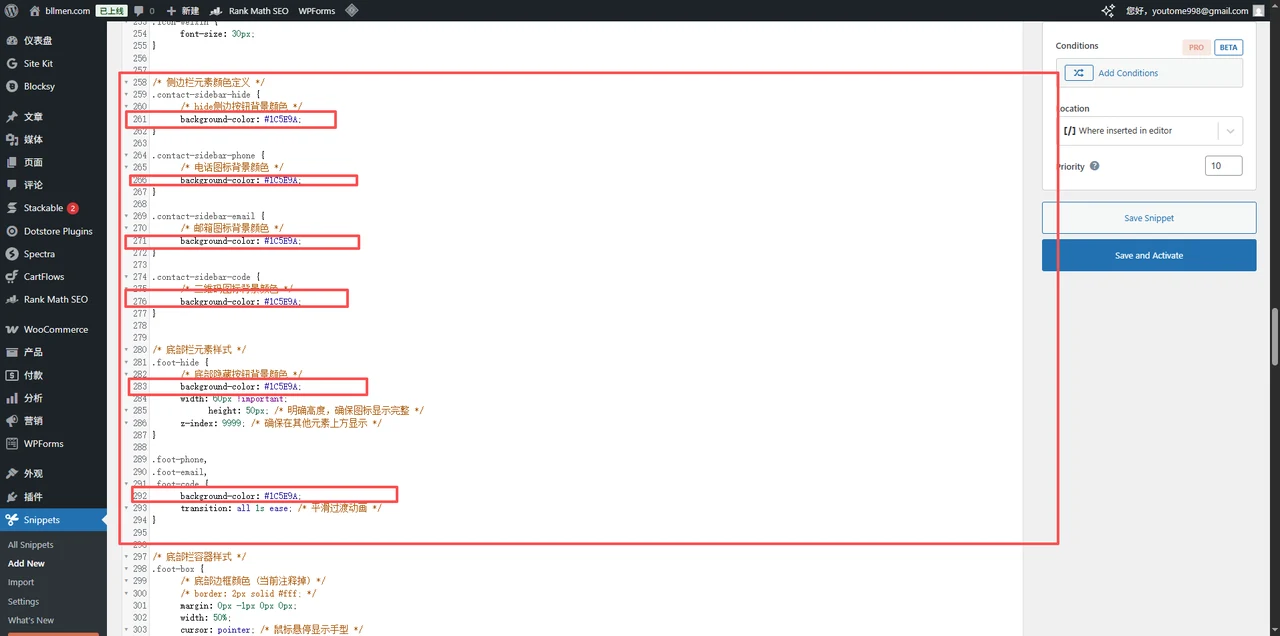
Replace phone, phoneDisplay and email in contactConfig. Use the international country code and number for the WhatsApp link; format the displayed number separately. The email link uses mailto:. Screenshot line numbers refer to this example, so use variable names after editing.
Use border-radius: 50% for circles, 0% for squares, or a smaller percentage for rounded corners. Match the button backgrounds to the site while keeping the icons and text readable.
3. Load site-wide and check
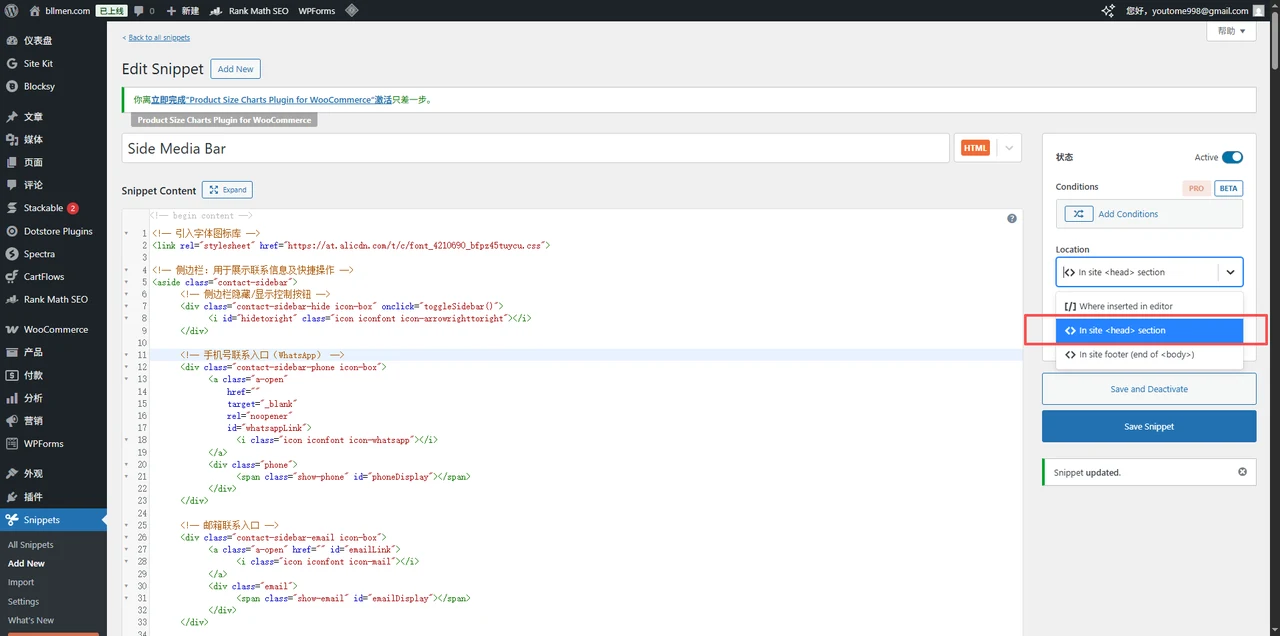
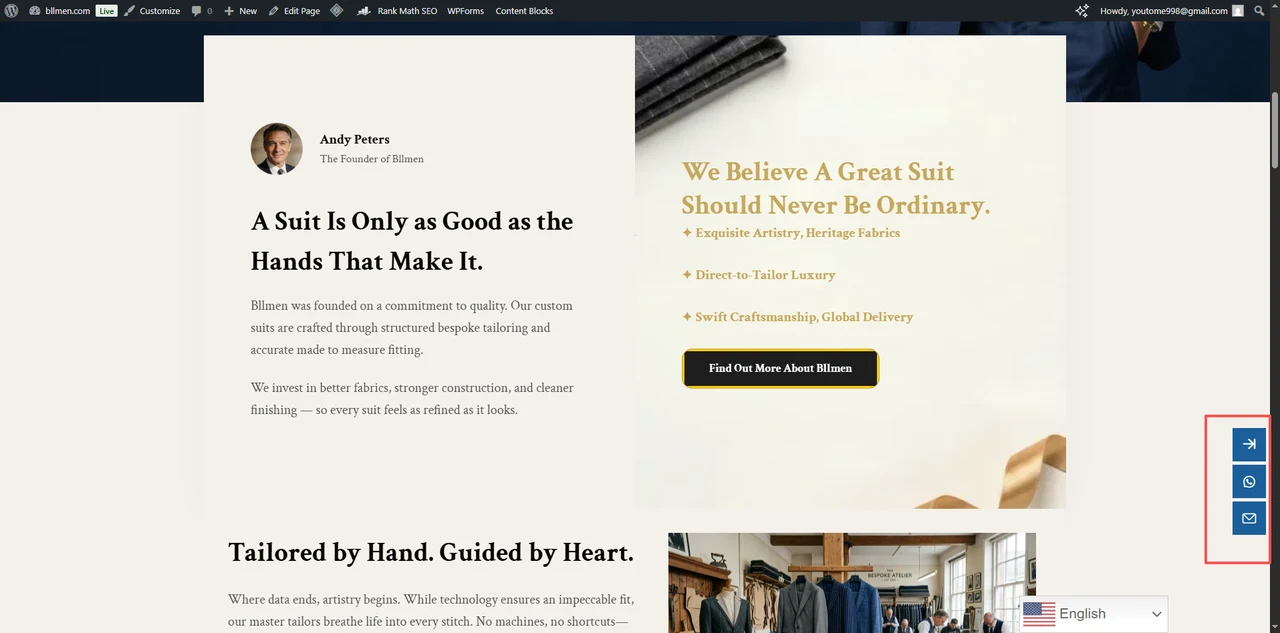
The screenshot shows the placement menu. Although the older screenshot selects head, this complete example includes visible HTML elements: select In site footer / end of body instead. Save and activate, then check the desktop sidebar, mobile footer, expand/collapse control, WhatsApp destination and email link.
Complete example code
<!-- Import the icon font library -->
<link rel="stylesheet" href="https://at.alicdn.com/t/c/font_4210690_bfpz45tuycu.css">

<!-- Sidebar: contact details and quick actions -->
<aside class="contact-sidebar">
    <!-- Sidebar hide/show toggle button -->
    <div class="contact-sidebar-hide icon-box" onclick="toggleSidebar()">
        <i id="hidetoright" class="icon iconfont icon-arrowrighttoright"></i>
    </div>

    <!-- Phone contact entry (WhatsApp) -->
    <div class="contact-sidebar-phone icon-box">
        <a class="a-open"
           href=""
           target="_blank"
           rel="noopener"
           id="whatsappLink">
             <i class="icon iconfont icon-whatsapp"></i>
        </a>
        <div class="phone">
            <span class="show-phone" id="phoneDisplay"></span>
        </div>
    </div>

    <!-- Email contact entry -->
    <div class="contact-sidebar-email icon-box">
        <a class="a-open" href="" id="emailLink">
             <i class="icon iconfont icon-mail"></i>
        </a>
        <div class="email">
            <span class="show-email" id="emailDisplay"></span>
        </div>
    </div>

    <!-- QR code display (not enabled yet)
    <div class="contact-sidebar-code icon-box">
        <a class="a-open" href="#" target="_blank" rel="noopener">
            <i class="icon iconfont icon-weixin"></i>
        </a>
        <div class="code">
            <img class="show-code" src="../../images/code.png" alt="WeChat QR code">
        </div>
    </div>
    -->

    <!-- Back-to-top button (not enabled yet)
    <div class="contact-sidebar-totop icon-box" onclick="toTop()">
        <i class="icon fa fa-light fa-arrow-up fa-lg"></i>
    </div>
    -->
</aside>

<!-- Bottom bar: contact details on mobile -->
<footer class="footerbar" id="footerbar">
    <!-- Bottom bar hide/show toggle button -->
    <div class="foot-hide foot-box" onclick="toggleFooter()">
        <i id="hidetoleft" class="icon iconfont icon-arrowlefttoleft"></i>
    </div>

    <!-- Bottom bar phone entry -->
    <div class="foot-phone foot-box">
        <a class="a-open"
           href=""
           target="_blank"
           rel="noopener"
           id="footerWhatsappLink">
             <i class="icon iconfont icon-whatsapp"></i>
        </a>
        <div class="show-footer_phone">
            <span class="show-phone" id="footerPhoneDisplay"></span>
        </div>
    </div>

    <!-- Bottom bar email entry -->
    <div class="foot-email foot-box">
        <a class="a-open"
           href=""
           target="_blank"
           rel="noopener"
           id="footerEmailLink">
             <i class="icon iconfont icon-mail"></i>
        </a>
        <div class="show-footer_email">
            <span class="show-email" id="footerEmailDisplay"></span>
        </div>
    </div>

    <!-- Bottom bar QR code (not enabled yet)
    <div class="foot-code foot-box">
        <i class="icon iconfont icon-erweima"></i>
        <div class="show-footer_code">
            <img src="../../images/code.png" alt="Support QR code">
        </div>
    </div>
    -->

    <!-- Bottom bar back-to-top (not enabled yet)
    <div class="foot-totop foot-box" onclick="toTop()">
        <i class="icon-foot fa fa-light fa-arrow-up fa-lg "></i>
    </div>
    -->
</footer>

<script>
    // Configuration - change the contact details here and every usage updates automatically
    const contactConfig = {
        phone: '8613800000000',       // Phone number (used for the link)
        phoneDisplay: '+86 15862618383', // The phone number shown
        email: 'hello@example.com' // Email address
    };

    // Initialise the contact details
    function initContactInfo() {
        // Update the sidebar contact details
        document.getElementById('whatsappLink').href = `https://api.whatsapp.com/send?phone=${contactConfig.phone}`;
        document.getElementById('phoneDisplay').textContent = contactConfig.phoneDisplay;
        document.getElementById('emailLink').href = `mailto:${contactConfig.email}`;
        document.getElementById('emailDisplay').textContent = contactConfig.email;

        // Update the bottom bar contact details
        document.getElementById('footerWhatsappLink').href = `https://api.whatsapp.com/send?phone=${contactConfig.phone}`;
        document.getElementById('footerPhoneDisplay').textContent = contactConfig.phoneDisplay;
        document.getElementById('footerEmailLink').href = `mailto:${contactConfig.email}`;
        document.getElementById('footerEmailDisplay').textContent = contactConfig.email;
    }

    // Initialise the contact details after the page loads
    window.addEventListener('DOMContentLoaded', initContactInfo);

    // Sidebar toggle counter (controls the icon rotation)
    let sidebarToggleCount = 0;
    // Bottom bar toggle counter
    let footerToggleCount = 0;

    /**
     * Toggle the sidebar's show/hide state
     * 1. Rotate the toggle button
     * 2. Slide the contact details in and out
     */
    function toggleSidebar() {
        // Get the DOM elements
        const toggleIcon = document.getElementById('hidetoright');
        const whatsappItem = document.querySelector('.contact-sidebar-phone');
        const emailItem = document.querySelector('.contact-sidebar-email');
        const codeItem = document.querySelector('.contact-sidebar-code');

        // Update the rotation (180 degrees per click)
        sidebarToggleCount += 180;
        toggleIcon.style.transform = `translate(-50%, -50%) rotate(${sidebarToggleCount}deg)`;

        // Toggle the show/hide state
        const isHidden = whatsappItem.style.transform === 'translateX(100px)';
        if (isHidden) {
            // Show the element
            whatsappItem.style.transform = 'translateX(0)';
            emailItem.style.transform = 'translateX(0)';
            if (codeItem) codeItem.style.transform = 'translateX(0)';
        } else {
            // Hide the element
            whatsappItem.style.transform = 'translateX(100px)';
            emailItem.style.transform = 'translateX(100px)';
            if (codeItem) codeItem.style.transform = 'translateX(100px)';
        }
    }

    /**
     * Toggle the bottom bar's show/hide state
     * 1. Rotate the toggle button
     * 2. Slide the contact details in and out
     */
    function toggleFooter() {
        // Get the DOM elements
        const toggleIcon = document.getElementById('hidetoleft');
        const whatsappItem = document.querySelector('.foot-phone');
        const emailItem = document.querySelector('.foot-email');
        const codeItem = document.querySelector('.foot-code');

        // Update the rotation (180 degrees per click)
        footerToggleCount += 180;
        toggleIcon.style.transform = `translate(-50%, -50%) rotate(${footerToggleCount}deg)`;

        // Toggle the show/hide state
        const isHidden = whatsappItem.style.transform === 'translateX(-1000px)';
        if (isHidden) {
            // Show the element
            whatsappItem.style.transform = 'translateX(0)';
            emailItem.style.transform = 'translateX(0)';
            if (codeItem) codeItem.style.transform = 'translateX(0)';
        } else {
            // Hide the element
            whatsappItem.style.transform = 'translateX(-1000px)';
            emailItem.style.transform = 'translateX(-1000px)';
            if (codeItem) codeItem.style.transform = 'translateX(-1000px)';
        }
    }

    /**
     * Scroll back to the top
     * Handles the different ways browsers report scroll height
     */
    function toTop() {
        // Modern browsers
        if (window.scrollTo) {
            window.scrollTo(0, 0);
        } else {
            // Older browsers
            document.body.scrollTop = 0;
            document.documentElement.scrollTop = 0;
        }
    }
</script>
<style>
/* Base styles for the icon container */
.icon-box {
    width: 50px;
    height: 50px;
    /* Circle border colour (currently commented out) */
    /* border: 2px solid #c9c9c9; */
    border-radius: 50%;
    position: relative;
    /* Background colour inside the circle */
    background-color: rgba(255, 255, 255, 0.25);
    margin-bottom: 5px;
}

/* Shared icon styles */
.icon {
    /* Sidebar icon colour */
    color: #fff;
    position: absolute;
    top: 50%;
    left: 50%;
    transform: translate(-50%, -50%);
    transform-origin: 50% 50%;
}

/* Adjustments for specific icons */
.icon-arrowrighttoright {
    font-size: 30px !important;
}

.icon-mail {
    font-size: 20px !important;
    top: 47%; /* Fine-tune the mail icon's vertical position */
}

.icon-whatsapp {
    font-size: 20px !important;
}

.icon-weixin {
    font-size: 30px;
}

/* Colour definitions for sidebar elements */
.contact-sidebar-hide {
    /* Background colour of the hide button */
    background-color: #1C5E9A;
}

.contact-sidebar-phone {
    /* Phone icon background colour */
    background-color: #1C5E9A;
}

.contact-sidebar-email {
    /* Email icon background colour */
    background-color: #1C5E9A;
}

.contact-sidebar-code {
    /* QR code icon background colour */
    background-color: #1C5E9A;
}

/* Bottom bar element styles */
.foot-hide {
    /* Bottom hide button background colour */
    background-color: #1C5E9A;
    width: 60px !important;
    height: 50px; /* Explicit height so the icon is not clipped */
    z-index: 9999; /* Make sure it renders above other elements */
}

.foot-phone,
.foot-email,
.foot-code {
    background-color: #1C5E9A;
    transition: all 1s ease; /* Smooth transition */
}

/* Bottom bar container styles */
.foot-box {
    /* Bottom border colour (currently commented out) */
    /* border: 2px solid #fff; */
    margin: 0px -1px 0px 0px;
    width: 50%;
    cursor: pointer; /* Show a pointer on hover */
    position: relative;
}

/* Border adjustments for bottom bar elements */
.foot-box:nth-child(2),
.foot-box:nth-child(3),
.foot-box:nth-child(4) {
    border-left: 0px;
}

/* Overall bottom bar styles */
.footerbar {
    z-index: 9999; /* Make sure it sits above the page content */
    position: fixed;
    left: 0;
    bottom: 0;
    width: 100%;
    height: 50px;
    text-align: center;
    display: flex;
    justify-content: space-around;
    transition: all 0.3s linear; /* Smooth transition effect */
}

/* Bottom bar icon styles */
.icon-foot {
    /* Bottom icon colour */
    color: rgb(86, 86, 243);
    position: absolute;
    left: 50%;
    top: 50%;
    transform: translate(-50%, -50%);
}

/* Pop-up message styles */
.code > .show-code,
.email > .show-email,
.phone > .show-phone {
    /* Sidebar pop-up text size */
    font-size: 18px;
    white-space: nowrap; /* Prevent text wrapping */
    padding: 0px 20px;
}

/* Overall sidebar styles */
.contact-sidebar {
    position: fixed;
    z-index: 9999; /* Make sure it sits above the page content */
    right: 0;
    bottom: 15%;
    padding: 6px 6px 0;
    border-radius: 20px 0 0 20px; /* Rounded corner on the right */
}

/* Animation for sidebar elements */
.contact-sidebar-phone {
    transition: all 1.2s; /* Transition time for the phone icon */
}

.contact-sidebar-email {
    transition: all 0.9s; /* Transition time for the email icon */
}

.contact-sidebar-code {
    transition: all 0.6s; /* Transition time for the QR code icon */
}

.icon-arrowlefttoleft {
    font-size: 30px !important; /* Make the bottom arrow bigger so it matches the sidebar arrow */
}

.icon-arrowlefttoleft,
.icon-arrowrighttoright {
    transition: all 0.3s; /* Transition time for the arrow icon */
}

/* Styles for elements inside the sidebar */
.contact-sidebar > div {
    cursor: pointer; /* Show a pointer on hover */
    text-align: center;
}

.contact-sidebar > div h3 {
    font-size: 15px;
    font-weight: 500;
    color: #fff;
}

/* Sidebar pop-up styles */
.contact-sidebar > div .code,
.contact-sidebar > div .email,
.contact-sidebar > div .phone,
.contact-sidebar > div .hide {
    padding: 6px;
    align-items: center;
    display: none; /* Hidden by default */
    position: absolute;
    z-index: 9999; /* Make sure it renders above the icon */
    top: 15%;
    right: 70px; /* Show it to the left of the icon */
    border-radius: 8px;
    box-shadow: 8px 8px 8px 8px rgba(88, 95, 110, 0.22); /* Drop shadow */
    background-color: #f7f7f7;
}

/* Bottom bar pop-up styles */
.footerbar > div .show-footer_code,
.footerbar > div .show-footer_email,
.footerbar > div .show-footer_phone {
    padding: 6px;
    align-items: center;
    display: none; /* Hidden by default */
    position: absolute;
    z-index: 9999; /* Make sure it renders above the icon */
    bottom: 110%; /* Show it above the icon */
    font-size: 10px;
    border-radius: 8px;
    box-shadow: 8px 8px 8px 8px rgba(88, 95, 110, 0.22); /* Drop shadow */
    background-color: #f7f7f7;
}

/* Arrow styles for the sidebar pop-up */
.contact-sidebar > div .email:after,
.contact-sidebar > div .phone:after,
.contact-sidebar > div .code:after {
    position: absolute;
    top: 50%;
    left: 100%; /* Show the arrow on the right */
    content: '';
    transform: translateY(-50%);
    border-width: 5px;
    border-style: solid;
    border-color: transparent transparent transparent #ffffff; /* Triangle arrow */
}

/* Show the pop-up on hover */
.contact-sidebar-email:hover .email,
.contact-sidebar-phone:hover .phone,
.contact-sidebar-code:hover .code,
.foot-email:hover .show-footer_email,
.foot-phone:hover .show-footer_phone,
.foot-code:hover .show-footer_code {
    display: block;
}

/* QR code image styles */
.show-footer_code > img,
.code > img {
    width: 80px !important;
}

/* Phone pop-up width */
.phone {
    width: 200px;
}

/* Link styles */
.a-lg {
    width: 100px;
    height: 100px;
}

.a-open {
    display: block;
    height: 50px;
    border-radius: 50px;
}

/* Responsive visibility */
@media (min-width: 770px) {
    /* Hide the bottom bar on large screens */
    .footerbar {
        display: none;
    }
}

@media (max-width: 770px) {
    /* Hide the sidebar on small screens */
    .contact-sidebar {
        display: none;
    }
}
</style>