Background
A server with 2 cores and 4GB of RAM hosts a WordPress corporate site, alongside the Baota panel, PHP-FPM, MySQL and Redis.
Monitoring showed the load hitting 100 percent, yet CPU usage was not high and memory was not exhausted.
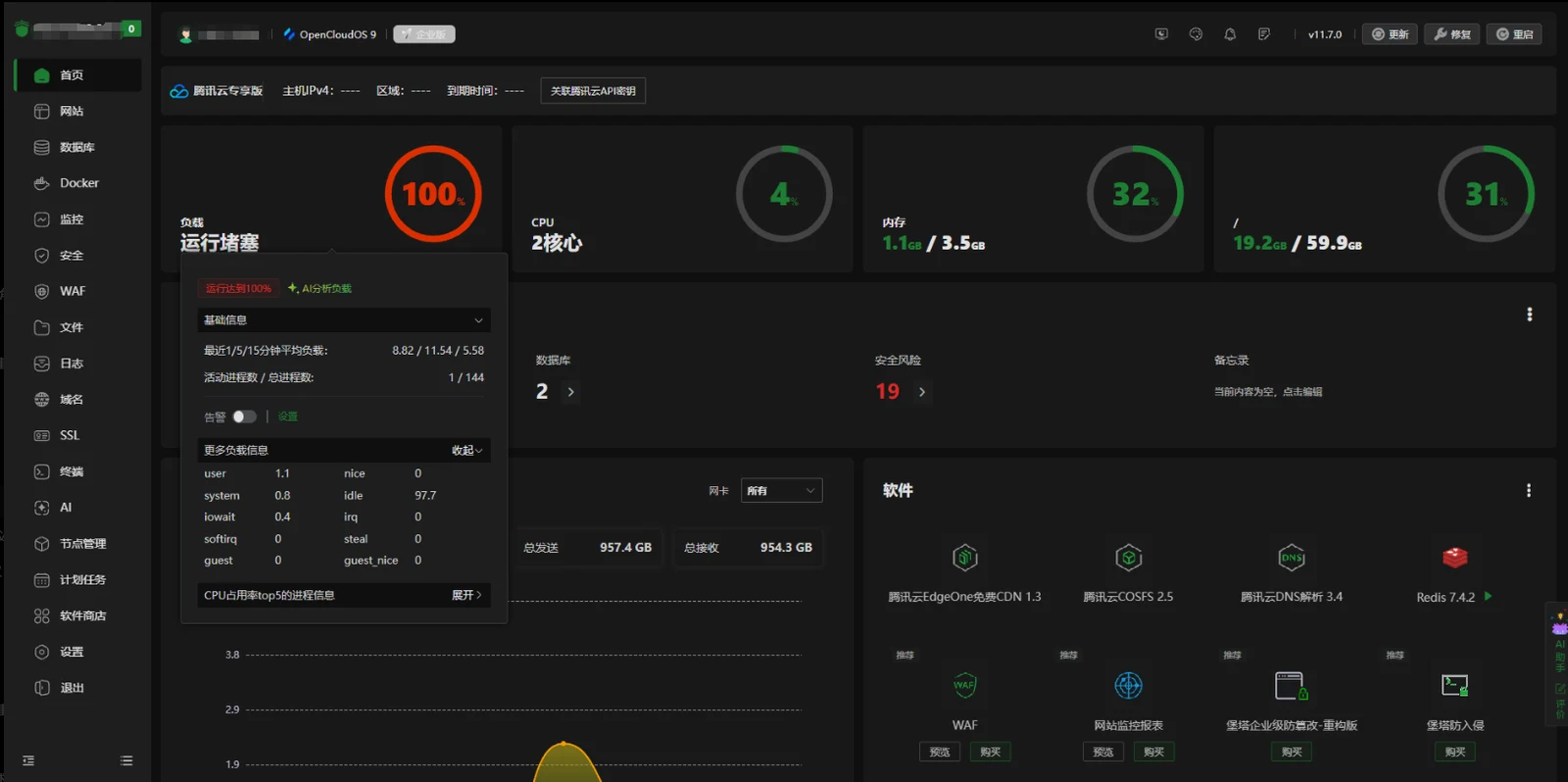
System load showed:
1-minute load:8.82
5-minute load:11.54
15-minute load:5.58
But the CPU looked like:
idle:97%
iowait:0.2%
So the source of the load needed further investigation.
Question one: the load is at 100%, so why isn't the CPU saturated?
Why
Linux's load average is not the same thing as CPU usage.
Server load includes:
- tasks currently using the CPU
- tasks waiting for the CPU
- tasks waiting on disk or other resources
So you can have:
- very low CPU usage
- normal memory
- and a very high load average
This situation is usually related to:
- blocked PHP requests
- database queries waiting
- disk I/O
- a large number of concurrent tasks
Question two: how do you confirm whether WordPress is the cause?
Method
Look at the access log:
tail -5000 /www/wwwlogs/web-chang.com.logCount the endpoints being hit:
awk '{print $7}' log file | sort | uniq -c | sort -nrThe investigation found a lot of requests concentrated on:
/wp-admin/admin-ajax.php

/wp-json/elementor/v1/checklist/user-progress

/wp-json/elementor/v1/global-classes

/wp-json/rankmath/v1/updateMeta

/wp-cron.php

admin-ajax.php?action=as_async_request_queue_runner
which means the main pressure comes from WordPress admin endpoints and plugin tasks.
Question three: which components are generating all these requests?
Analysing the cause
Main sources:
1. Elementor
The Elementor page editor keeps calling:
- REST API
- page state sync
- global style sync
- check tasks
For example:
/wp-json/elementor/v1/checklist/user-progress2. WP-Cron
WordPress triggers scheduled tasks on visits by default.
When someone visits:
/wp-cron.php?doing_wp_cronit runs:
- plugin tasks
- data synchronisation
- cleanup tasks
- queue tasks
As traffic grows, that creates extra PHP requests.
3. Action Scheduler
When the log shows:
admin-ajax.php?action=as_async_request_queue_runnerit means WordPress's async task queue is running.
Common sources:
- Elementor
- WooCommerce
- Rank Math
- form plugins
Question four: how do you reduce WordPress's server load?
Solution one: turn off WP-Cron's automatic trigger
Edit:
wp-config.phpAdd:
define('DISABLE_WP_CRON', true);Then run it from a server cron job:
wget -q -O - https://example.com/wp-cron.php?doing_wp_cron >/dev/null 2>&1set it to run every ten minutes.
That stops visitor traffic from triggering background tasks.
Solution two: limit PHP-FPM concurrency
A 2-core, 4GB server should not run too many PHP processes.
Recommendation:
pm.max_children = 8
pm.start_servers = 2
pm.min_spare_servers = 1
pm.max_spare_servers = 3
pm.max_requests = 500
avoid many PHP child processes holding memory at the same time.
Solution three: enable PHP OPcache
Enable:
opcache.enable=1
opcache.memory_consumption=128
opcache.max_accelerated_files=10000
to cut the cost of recompiling PHP.
Solution four: check Action Scheduler jobs
Query the database:
SELECT status, COUNT(*)
FROM wp_actionscheduler_actions
GROUP BY status;
If a large number of jobs are in:
pending
failed
you need to clean them up or look at the plugin responsible.
Question five: why is a 2-core, 4GB server so prone to this?
Why
A WordPress environment usually includes:
- Nginx
- PHP-FPM
- MySQL
- Redis
- the Baota panel
- several plugins
On 2 cores and 4GB, the resources actually left for WordPress are limited.
When these happen at the same time:
- someone editing a page in Elementor
- WP-Cron running its tasks
- a plugin syncing in the background
- database queries piling up
more PHP requests lead to:
- more PHP-FPM processes
- more memory pressure
- swap being used
- and system load climbing
Summary
The main causes of this load spike:
- WordPress's Elementor admin requests are numerous.
- WP-Cron keeps triggering tasks.
- Action Scheduler runs its async queue.
- PHP-FPM concurrency was never tuned for a low-spec server.
What to optimise in the end:
- disable WP-Cron's default trigger.
- run cron from a scheduled job.
- cap the number of PHP-FPM processes.
- enable OPcache.
- inspect the background jobs plugins create.
On a 2-core, 4GB server running a WordPress corporate site, the point is not to add more PHP processes but to control how many background tasks and plugin requests are running.
For the configuration screens, see Baota tuning for a low-spec WordPress server. Identify the load source before adjusting resource limits.